


Caregivers: Scheduled Virtual Support Groups That Deliver One Next Step
The fastest way to find virtual caregiver support groups is through the National Institute on Aging, the Administration for Community Living, Alzheimer’s.gov, and the VA Caregiver Support Program if you’re caring for a veteran. Pick one, look up its next scheduled meeting, and register today. Test your camera and microphone beforehand. Remember: these groups offer peer support and shared resources, not medical guidance.
Table of Contents
- What Virtual Caregiver Support Groups Actually Look Like
- Finding Scheduled Virtual Groups: Where to Look First
- How to Choose the Right Group for Your Situation
- Getting Ready for Your First Session: A Checklist
- Getting the Most Out of Virtual Support Group Discussions
- Common Challenges in Virtual Caregiver Support Groups
- Privacy and Data Security on Virtual Platforms
- When Group Support Isn’t Enough: One-on-One Options
- How Scheduled Virtual Groups Fit Into a Bigger Support Plan
- When a Managed Virtual Caregiver Program Complements Peer Support
- Sources
- FAQ
What Virtual Caregiver Support Groups Actually Look Like
Not every online caregiver community works the same way, and that surprises a lot of first-timers. Some run as live video meetings with a set agenda. Others operate as email lists where members post questions and replies roll in over days, not minutes. Still others are asynchronous forums you can read at 2 a.m. when sleep isn’t coming and the walls feel close.
The National Institute on Aging recommends joining an online or in-person group specifically because sharing your situation with someone who understands it changes how heavy it feels. Family Caregiver Alliance, for example, runs its Caregiver Online Support Group entirely by email, which suits caregivers who can’t commit to a fixed hour every week.
A scheduled session typically follows a rhythm you can count on:
- Registration or a short intake conversation before your first meeting
- A brief check-in where each person shares how the week has gone
- A focused discussion topic or open floor for pressing concerns
- Resource sharing, sometimes a handout or referral list
- A closing round, often with a reminder of the next meeting date
Facilitation varies by program. Some groups are peer-led, run by caregivers with no professional training but plenty of lived experience. Others pair a licensed mental health professional with a peer facilitator, a model the Administration for Community Living documents in its virtual support programs because it combines clinical safety with credibility. Still others are led by a social worker attached to a hospital or Area Agency on Aging.
One distinction matters more than any other: these groups exist for emotional support and resource sharing, not clinical advice. If a facilitator starts diagnosing symptoms or adjusting medication guidance, that’s a sign to look elsewhere.
Finding Scheduled Virtual Groups: Where to Look First
Start at the top and work outward. National organizations maintain the most current listings, and local routes fill in the gaps national directories miss.
- National Institute on Aging caregiving pages list group formats and connect you to established programs.
- Administration for Community Living maintains program listings, including specialized options like the paralysis caregiver groups it recently launched.
- Alzheimer’s.gov aggregates federal referral routes, including the VA Caregiver Support Program, which is the direct path for anyone caring for a veteran and worth checking first if that applies to you.
- Area Agencies on Aging and state aging offices often know about local hybrid programs that blend virtual and in-person meetings.
- Hospital social workers and disease-specific organizations (Alzheimer’s associations, stroke recovery networks, MS societies) frequently run condition-matched groups you won’t find through a general search.
- Local senior centers sometimes host virtual groups even when their physical building is closed to the public.
When you search, be specific. Try phrases like “dementia caregiver virtual support group” or “veteran caregiver online support group” rather than a generic search for online caregiver communities. Include your time zone in the search when possible, since national programs often run on Eastern or Central time and you don’t want to show up an hour late.
Before you register anywhere, confirm three things: whether the group is free or has a fee, whether you’re eligible based on the relationship to the person you care for, and what accessibility options exist. A program that looks perfect on paper isn’t useful if it lacks captions and you’re hard of hearing.
How to Choose the Right Group for Your Situation
Every virtual caregiver support group is not built the same, and the wrong fit can leave you more frustrated than when you started. Before committing your Tuesday evenings, run through a short checklist.
What to verify before joining:
- Facilitator credentials: peer-led, professionally co-facilitated, or social-worker-led
- Condition match: does the group focus on dementia, general chronic illness, stroke recovery, or veteran caregiving specifically
- Group size and continuity: a rotating cast of strangers feels different than a stable group that meets the same people each week
- Frequency and time zone: weekly, biweekly, monthly, and whether the schedule actually fits your life
- Accessibility: captions, ASL interpretation, dial-in audio for low-bandwidth situations
- Cost and eligibility: most nonprofit and government-recommended programs are free, but availability and fees vary by organization, so confirm directly
- Confidentiality policy: are sessions recorded, and if so, who has access
Ask the organizer these questions before your first meeting: “Who facilitates the group?” “Is there an intake process?” “Can I observe one session before committing?” “Do you send a resource list after meetings?” “Are sessions recorded or is this a closed group?”
Watch for red flags. A group heavy on product promotion, light on actual moderation, vague about privacy, or one where the same crisis gets discussed meeting after meeting with no referral offered, isn’t serving its members well.
Pro Tip: Ask what happens between meetings. Groups that send a recap, a referral list, or a way to message other members outside the scheduled hour tend to deliver more practical help than groups where the connection ends the moment the call disconnects.
If a group feels too general, you may get warm encouragement but no real answers on dementia-specific behaviors or VA paperwork. If it’s too narrow, sessions can turn emotionally intense fast. Aim for the middle, or ask to observe a session first before deciding.
Getting Ready for Your First Session: A Checklist
A little preparation turns a nerve-wracking first meeting into something genuinely useful.
- Write down the basics: your care recipient’s condition and stage, your role (spouse, adult child, sibling), and two or three specific problems you want input on.
- List one or two questions you’d ask a clinician if you had five uninterrupted minutes with one. Groups often surface answers from members who’ve faced the same issue.
- Test your technology the day before: the meeting link, your camera, your microphone, and headphones if privacy at home is limited. Confirm a dial-in number exists as backup.
- Check accessibility features in advance if you need captions, ASL, or a low-bandwidth option.
- Decide how you want to be identified. First names or pseudonyms are common and completely acceptable.
- Confirm the recording policy before you speak candidly about anything personal.
- Line up backup coverage for the person you care for during the meeting window, even if it’s just a phone nearby in case something comes up.
Walk in with one modest goal: leave with a single concrete next step, whether that’s a resource name, a referral, or an appointment idea. Groups that consistently deliver that outcome are worth returning to.
Getting the Most Out of Virtual Support Group Discussions
Showing up isn’t the same as engaging, and engaging is where the real value lives. Speak early in the meeting, even if it’s just a short check-in comment. Caregivers who wait for a perfect moment to jump in often never find one, and the group loses the benefit of hearing from them.
Ask specific questions instead of general ones. “How do you handle sundowning in the evening?” gets you further than “any advice for dementia care?” The more precise your question, the more useful the answers you’ll get from people who’ve lived through the exact situation.
Take notes during the session, even informal ones. A comment that seems minor in the moment (“I switched to a different medical alert system after mine kept failing”) can become the detail you need three weeks later. Many caregivers say the most valuable exchanges happen in the small, practical tips traded between the “official” discussion topics.
Give as much as you take. Virtual caregiver support groups run on reciprocity. If someone shares a struggle you’ve navigated, offer what worked, even imperfectly. That exchange is what separates a functioning peer community from a one-way advice line.
Mute yourself when you’re not speaking, especially in larger groups, and use the chat function for quick reactions so you don’t interrupt someone mid-thought. Small etiquette choices like this keep virtual meetings from feeling chaotic.
Common Challenges in Virtual Caregiver Support Groups
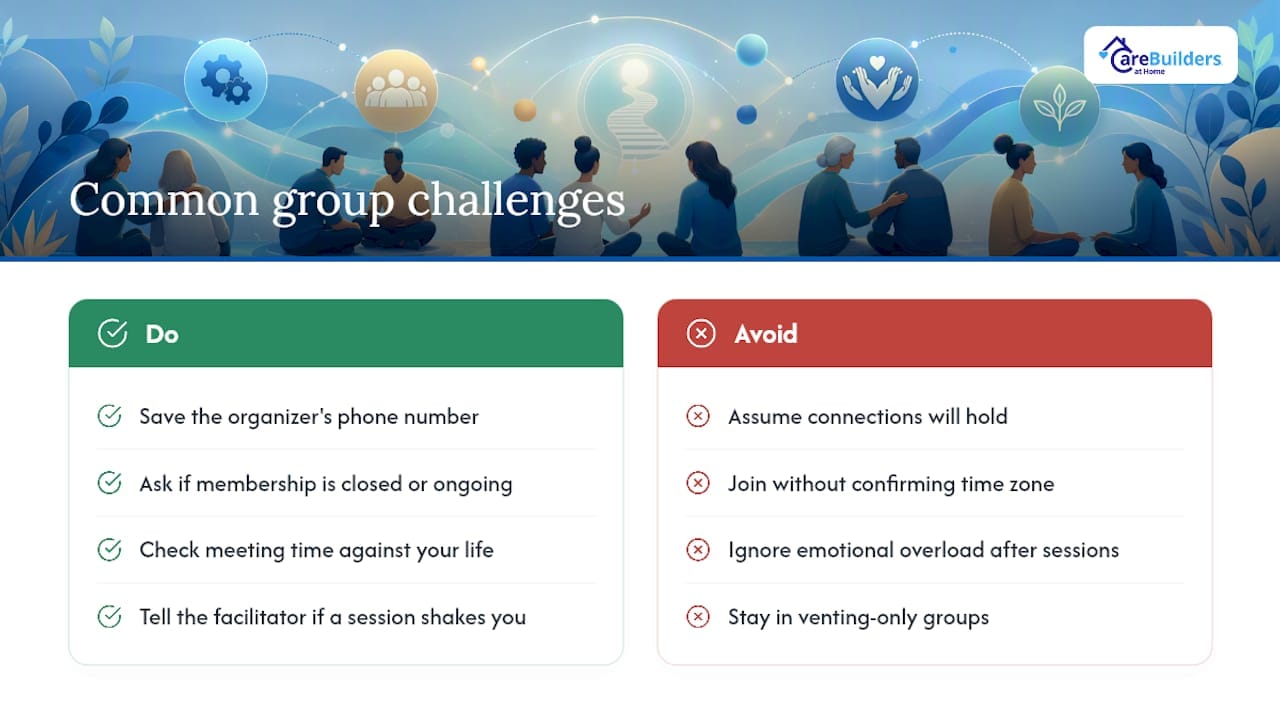
Technology fails at the worst moments. A dropped connection during someone’s most vulnerable share is more than an inconvenience, it can feel like a small betrayal. Have a phone number for the group organizer saved in advance so a lost connection doesn’t mean a lost session.
Group dynamics shift when membership rotates constantly. A group with a revolving cast never builds the trust that makes deep sharing feel safe. If you notice a group struggling with churn, ask the facilitator whether membership is closed or ongoing, and whether that’s likely to change.
Time zone mismatches quietly derail otherwise excellent programs. A caregiver on the West Coast joining an Eastern time meeting may find it lands during dinner and medication routines every single week. Check the schedule against your actual life before committing, not just once.
Emotional overload is real in condition-specific groups, particularly dementia and end-of-life discussions. A well-run group builds in time to decompress before closing, but not all of them do. If a session leaves you shaken rather than supported, mention it to the facilitator. A good one will adjust pacing or check in privately afterward.
Finally, some groups drift into venting without resolution. Venting has its place, but a group that never moves toward resources, referrals, or practical suggestions eventually leaves members feeling stuck rather than supported.
Privacy and Data Security on Virtual Platforms
Confidentiality in a living room is different from confidentiality on a screen, and that distinction matters more than most caregivers realize until something goes wrong. Ask directly whether sessions are recorded, who can access any recording, and how long it’s kept before your first meeting, not after.
Closed groups, meaning membership requires approval and the meeting link isn’t shared publicly, offer more protection than open forums anyone can join with a click. If a group’s registration process feels careless (no verification, no waiting room, no host control over who enters) that’s worth noticing before you say anything personal on camera.
Video platforms vary in their security defaults. A group using a waiting room feature and requiring a passcode is taking basic precautions seriously. One with an open link posted publicly on social media is not, regardless of how well-intentioned the organizer is.
You control more than you might think. Using a first name only, keeping your camera off if you’re not comfortable being seen, and declining to share identifying details about the person you care for are all reasonable boundaries. A well-run group will never pressure you past what you’re willing to disclose.
When Group Support Isn’t Enough: One-on-One Options
Support groups fill an important gap, but they were never designed to replace individual attention when a caregiving situation gets complicated. If you need someone to walk through your specific care plan, a licensed clinical social worker or geriatric care manager can offer guidance a peer group format simply isn’t built for.
Area Agencies on Aging typically offer individual case consultations at no cost, often the same organizations that host the group meetings themselves. Veterans caregivers have a dedicated route through VA caregiver support coordinators, who provide one-on-one guidance alongside group programming.
Counseling deserves separate mention. If persistent depression, anxiety, or safety concerns come up during a group session, that’s a sign the situation calls for individual professional assessment, not just peer encouragement. The CDC is direct about this: caregiver self-care includes support groups, but it also requires seeking professional help when symptoms persist.
Some families also look into managed services that pair trained caregivers with ongoing monitoring and benefits navigation, an option worth understanding even if group support remains your primary source of connection.
How Scheduled Virtual Groups Fit Into a Bigger Support Plan
Peer support groups do something professional services can’t always replicate: they remind you that what you’re carrying isn’t unusual, and that other people have found ways through it. That matters. But the National Institute on Aging frames groups as one piece of a larger self-care strategy, not a complete one. Respite, counseling, in-home help, and regular clinical follow-up all belong in the same plan.
We at CareBuilders at Home of Plano & Allen see this pattern often in the families we support: a caregiver finds real comfort in a weekly group, yet still needs someone physically present for overnight monitoring or dementia-specific behaviors a peer conversation can’t resolve. If depression, exhaustion, or safety concerns are showing up consistently, that calls for a conversation with a clinician, a VA caregiver coordinator, or your local Area Agency on Aging, not just another meeting.
— cbahplano
When a Managed Virtual Caregiver Program Complements Peer Support
Support groups and managed care solve different problems, and knowing which one you need right now matters. A peer group gives you connection and shared wisdom. It doesn’t give you someone watching for a fall at 3 a.m. or someone who knows how to redirect a dementia-related behavior in the moment.
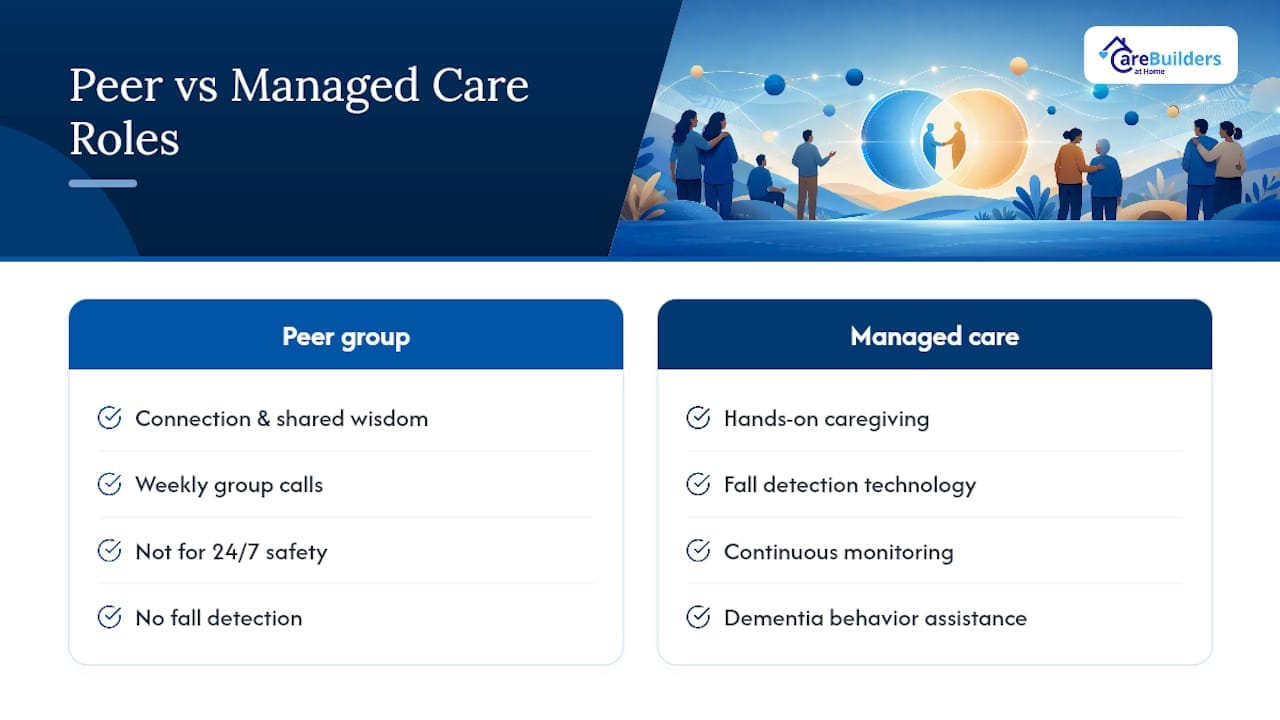
Some managed care providers combine trained caregivers with virtual monitoring and fall detection technology, so families get both hands-on support and continuous safety oversight, something a weekly group call was never designed to provide. If you’re caring for someone with dementia, need help understanding VA caregiver benefits, or simply need 24/7 coverage instead of an hour a week, that’s the point where a managed option makes sense alongside, or in place of, group participation.
Some home care providers help veteran families navigate benefits that can offset the cost of care. Our virtual caregiver platform and wellness program extends monitoring between visits, and our specialized dementia care team adjusts as needs change. If you’re weighing whether group support is enough or whether it’s time for hands-on help, consider speaking with a care team for guidance.
This article is general information, not a substitute for advice from a qualified doctor. Consult a qualified healthcare professional about your own circumstances before acting on anything here.
Sources
- Taking care of yourself: tips for caregivers | National Institute on Aging
- Taking care of yourself: tips for caregivers | Centers for Disease Control and Prevention
- Resources for caregivers | Alzheimer’s.gov
FAQ
Are there any online support groups for caregivers?
Yes. The National Institute on Aging recommends joining an online or in-person group, and options include live video meetings, email-based communities, and asynchronous forums. Family Caregiver Alliance, disease-specific organizations, and the VA Caregiver Support Program all host recurring virtual groups.
What is the best website for caregivers?
There isn’t one single best site, since needs vary by diagnosis and situation. Alzheimer’s.gov is a strong starting point for federal referral routes, while the National Institute on Aging offers broader self-care and group-format guidance.
What is caregiver fatigue?
Caregiver fatigue, sometimes called caregiver burnout, is the physical and emotional exhaustion that builds up from ongoing caregiving responsibilities. The CDC notes that caregivers often experience higher rates of certain negative health indicators, which is part of why self-care steps like joining a support group and seeking professional help when needed matter so much.
What do virtual caregivers do?
The term can mean two things: peer volunteers who facilitate online caregiver support groups, or managed virtual caregiver services that use technology to monitor a care recipient’s safety remotely. CareBuilders at Home of Plano & Allen’s virtual caregiver platform falls into the second category, combining monitoring technology with trained in-home caregivers.
How do I know if a group is condition-specific enough for my situation?
Ask the organizer directly whether the group focuses on your care recipient’s specific condition, such as dementia, stroke recovery, or veteran caregiving, or whether it’s a general caregiver group. If you’re unsure, request to observe one session before committing, since general groups may offer emotional support but limited condition-specific answers.