


How Senior Care Check-Ins Work Remotely: A Family Guide
TL;DR:
- Remote senior care check-ins are scheduled calls, texts, or virtual visits that confirm an older adult’s safety from a distance. If a senior does not respond, the system automatically alerts caregivers to ensure prompt assistance. Combining automated and human-led visits creates a reliable safety network that supports both safety monitoring and emotional connection.
Remote senior care check-ins are scheduled calls, texts, or virtual visits that confirm an older adult’s safety and well-being from a distance, then automatically alert caregivers if the senior does not respond. Understanding how senior care check-ins work remotely is the first step toward building a reliable safety net for your loved one. The industry term for this practice is “remote wellness monitoring,” and it covers everything from automated AI phone calls to human-led virtual visits. Roughly 7 million Americans provide long-distance care for an aging parent or relative, defined as living at least one hour away. That number shows just how many families need a dependable system to stay connected and informed.
How do remote senior care check-ins typically work?
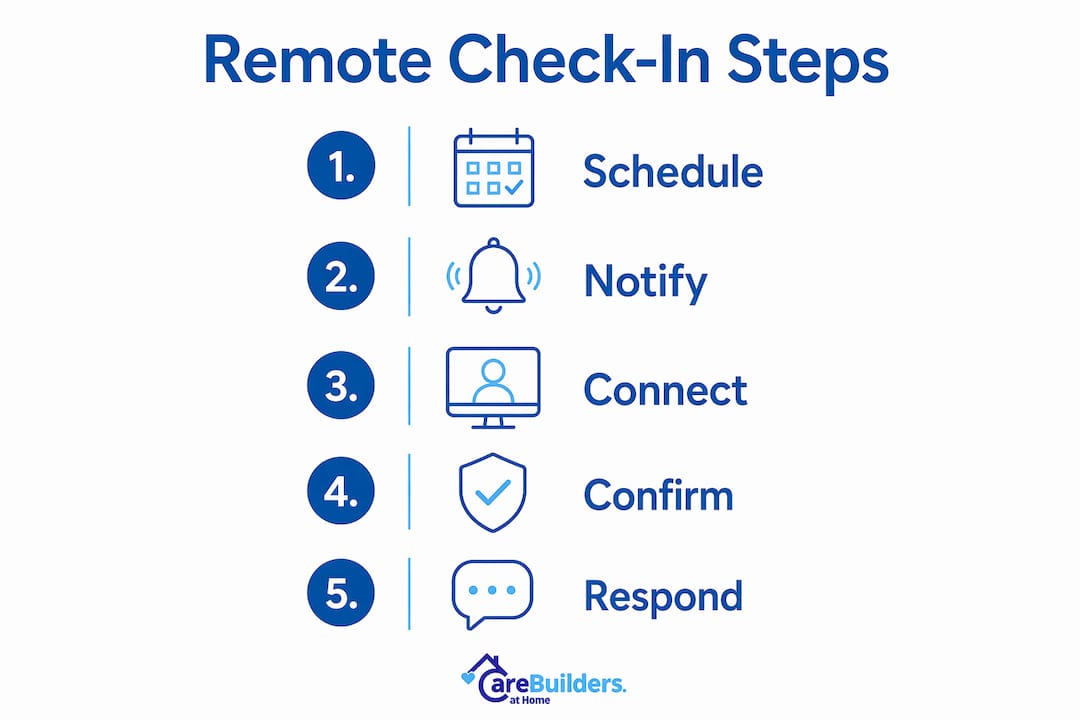
Remote wellness monitoring follows a predictable daily cycle. A check-in is scheduled at a set time, the senior responds, and the system logs a successful contact. If the senior does not respond, the system escalates through a clear protocol.
Here is how a typical daily check-in unfolds:
- Scheduled outreach. The system places a call or sends a text at a pre-set time, such as 9:00 AM each morning.
- Senior response. Your loved one answers the call, presses a button, or replies to a text to confirm they are well.
- Retry attempt. If there is no response, the system retries contact within a short window, often 15 minutes.
- Caregiver alert. After failed retries, up to 5 emergency contacts receive notifications via SMS, email, or phone call.
- Resolution. A designated first responder confirms the senior’s status and updates the rest of the care team.
Notification channels typically include email, SMS, and direct phone calls. That multi-channel approach means you are unlikely to miss an alert, even if one method fails.
Pro Tip: Set one person as the designated first responder for missed check-in alerts. A clear 15-minute response protocol among your care team prevents confusion and reduces alarm fatigue when alerts do fire.
The response window matters more than most families realize. A window that is too short triggers false alarms. A window that is too long delays real help. Most services let you customize this window based on your loved one’s routine and habits.
What are the main types of remote check-in services?
Remote check-in services fall into three broad categories, each with different costs, depth of care, and technology requirements.
Automated AI phone calls
Automated systems place a recorded or AI-generated call at a set time each day. The senior confirms they are well by pressing a button or speaking a simple response. Basic AI plans start around $9 per month, making this the most affordable entry point for families. These systems cover basic safety confirmation but cannot detect subtle changes in mood, speech, or cognitive function.
Human-led virtual wellness visits
A trained caregiver or care coordinator connects with your loved one via video or phone call. These visits go beyond a simple “are you okay?” check. They include medication reminders, hydration prompts, and genuine conversation. Human-led virtual check-ins cost about $95 per week for five 15-minute sessions. That investment buys something automated systems cannot provide: a real human who notices when something feels off.
Consistent human interaction helps maintain cognitive function and reduces loneliness for seniors living alone. That is a clinically meaningful benefit, not just a comfort feature.
Hybrid models
Hybrid approaches use automated calls for routine daily safety checks and human-led visits for deeper observation. Automated checks confirm basic safety. Human caregivers detect subtle cognitive or emotional changes that a recorded call would never catch. This combination delivers broad coverage at a manageable cost.
Key factors to consider when choosing a service type:
- Your loved one’s comfort with technology (phone only vs. video capable)
- The level of cognitive or physical support they currently need
- How many days per week a check-in is needed
- Whether medication reminders or emotional support are priorities
- Your budget and whether insurance or VA benefits apply
A virtual caregiver program can combine all three elements into one coordinated plan, which is worth exploring before committing to a single-service approach.
What are the benefits and limitations of remote check-ins?
Remote wellness monitoring delivers real, measurable value for families. It also comes with honest limitations that every caregiver should understand before relying on it as a standalone solution.
Benefits worth knowing
Remote check-ins reduce long-distance caregiver anxiety by ensuring immediate notification if a loved one fails to respond. That peace of mind is not trivial. Caregiver stress is a documented health risk, and knowing a system is watching gives families permission to breathe.
Early detection is another major advantage. Tracking responses over multiple days reveals trends that a single visit would miss. Effective remote care emphasizes trend-spotting over reacting to single-day events. A senior who sounds slightly confused on three consecutive calls is a different concern than one who had a rough morning.
Daily check-ins also provide structure and social connection for seniors living alone. Virtual wellness visits often last about five minutes but deliver consistent engagement and reassurance. For a senior who lives alone, that brief call can be the only human voice they hear that day.
Limitations to plan around
- Technology barriers: some seniors resist video calls or struggle with apps
- No physical presence: a call cannot detect a fall, a skin wound, or a medication error
- Alarm fatigue: too many alerts with no clear protocol trains caregivers to ignore them
- Cognitive decline: automated AI check-ins lack sensitivity to early cognitive changes detectable by human-led visits
Pro Tip: Limit technology tools to those that solve a specific care problem. Adding devices your loved one finds confusing creates “tech clutter” that undermines the entire monitoring system.
The Sensi.AI passive monitoring platform is one example of a tool that addresses a specific gap: detecting changes in daily activity patterns without requiring the senior to actively participate.
How can families effectively implement remote check-ins?
A well-run remote check-in system requires upfront planning. The technology is simple. The coordination is where most families stumble.
Follow these steps to set up a system that actually works:
- Assess your loved one’s needs and tech comfort. A senior with mild memory concerns needs human-led visits. A cognitively sharp senior who simply lives alone may do well with an automated daily call.
- Choose the right service type. Match the service to the need, not the price. A $9-per-month automated call is not the right fit for someone with early dementia.
- Set a clear schedule. Pick a check-in time that aligns with your loved one’s natural routine, such as after breakfast or before their afternoon rest.
- Designate a first responder. One person on the care team owns the missed check-in alert. Everyone else is a backup. Agreeing on a 15-minute response protocol prevents delays and confusion during real emergencies.
- Combine with in-person visits. Remote check-ins are not a replacement for physical presence. Schedule regular in-person visits alongside your remote monitoring plan.
- Talk to your loved one. Explain what the check-in system does and why you set it up. Seniors who understand and accept the system cooperate far better than those who feel surveilled.
Pro Tip: Review your check-in plan every 90 days. Your loved one’s needs will change, and a system that worked well in spring may need adjustment by fall.
A 24/7 medical alert monitoring layer pairs well with daily check-ins, covering the hours between scheduled calls when an emergency could still occur.
Key Takeaways
Remote senior care check-ins work best when automated safety monitoring, human-led social visits, and clear caregiver response protocols operate together as a coordinated system.
| Point | Details |
|---|---|
| Two main service types | Automated AI calls start around $9/month; human-led visits cost about $95/week for five sessions. |
| Missed check-in protocol | Systems retry contact, then alert up to 5 emergency contacts via SMS, email, or phone. |
| Human contact matters | Consistent human interaction supports cognitive function and reduces loneliness in seniors. |
| Avoid tech clutter | Limit tools to those solving a specific care problem; too many devices confuse seniors. |
| Designate one first responder | A named responder with a 15-minute protocol prevents alarm fatigue and delays in emergencies. |
Why I think families underestimate the human side of remote check-ins
Most families I speak with focus almost entirely on the technology when they start thinking about remote monitoring. They want to know which app to use, which device to buy, and how much it costs. Those are fair questions. But the families who report the greatest peace of mind are not the ones with the most sophisticated tech setup. They are the ones who built a system with a real human at the center.
Automated calls are reliable and affordable. They do their job. But they cannot tell you that your mother sounded more withdrawn than usual, or that she mentioned her neighbor twice in a way that suggested she was worried. A trained caregiver on a five-minute video call catches those signals. That is the difference between confirming someone is alive and actually knowing how they are doing.
The other thing families consistently underestimate is the value of that daily call for the senior themselves. Loneliness is a genuine health risk for older adults living alone. A brief, warm check-in from a familiar voice is not just monitoring. It is care. It gives your loved one something to look forward to each morning, and it gives you a real-time picture of their well-being that no sensor or button can replicate.
My honest recommendation: start with a hybrid model, even if it costs more than a basic automated plan. The additional investment in human contact pays back in early detection, better cooperation from your loved one, and your own reduced anxiety. Review the plan every few months and adjust as your loved one’s needs evolve. Technology should support that relationship, not replace it.
— cbahplano
How CareBuilders at Home of Plano & Allen supports your remote care plan
Remote check-ins work best when paired with professional in-person care. CareBuilders at Home of Plano & Allen provides personal care services and companion care that integrate directly with remote monitoring to create a complete picture of your loved one’s daily well-being. Our caregivers in Plano, Allen, Richardson, Wylie, and surrounding Collin County areas visit in person, fill the gaps that technology cannot, and communicate directly with your family. Whether your loved one needs help with daily tasks, meaningful social interaction, or specialized dementia support, we build a care plan around their specific needs. Contact CareBuilders at Home of Plano & Allen to schedule a free care assessment and find the right combination of remote and in-person support.
FAQ
What is a remote senior care check-in?
A remote senior care check-in is a scheduled call, text, or virtual visit that confirms an older adult’s safety and well-being from a distance. If the senior does not respond, the system alerts designated caregivers automatically.
How much do remote check-in services cost?
Costs range from around $9 per month for basic automated AI calls to about $95 per week for five human-led virtual wellness visits. The right choice depends on your loved one’s needs and the level of interaction required.
What happens if a senior misses a check-in?
The system retries contact within a set window, then sends alerts to up to 5 emergency contacts via SMS, email, or phone call. Having one designated first responder with a clear response protocol prevents delays.
Can remote check-ins replace in-person care?
Remote check-ins supplement in-person care but do not replace it. Automated systems cannot detect falls, physical changes, or early cognitive decline the way a trained caregiver can during an in-person visit.
Do seniors need special technology for remote check-ins?
Basic automated check-ins require only a standard phone. Human-led virtual visits may use a smartphone, tablet, or computer with video capability. Services designed for seniors prioritize ease of use to minimize technology barriers.
Recommended
- sensi.ai – CareBuilders at Home | Senior and Veteran Care in Plano, Allen & Richardson TX
- Virtual Caregiver – CareBuilders at Home | Senior and Veteran Care in Plano, Allen & Richardson TX
- Guide – CareBuilders at Home | Senior and Veteran Care in Plano, Allen & Richardson TX
- Personal Care – CareBuilders at Home | Senior and Veteran Care in Plano, Allen & Richardson TX