


Medical Alert Systems for Seniors: $25 a Month, Plus Care at Home
For families who want monitored alerts paired with hands-on, in-home support, we recommend starting with an integrated approach like 24/7 Medical Alert Monitoring from CareBuilders at Home, which combines emergency response with caregiver coordination. Standalone options worth comparing include Medical Guardian for device variety, MobileHelp for lower starting costs, LifeFone for battery life, and LifeStation for GPS accuracy. Most monitoring plans run $25 to $50 a month, with fall detection tested against a 9-of-12 benchmark in independent lab trials.
Table of Contents
- Top Medical Alert Systems Worth Comparing
- Comparing Monitoring Fees, Fall Detection, and Coverage
- Profiles of the Leading Alert Systems and Services
- How to Choose the Right Medical Alert System
- What Medical Alert Systems Actually Cost
- How Reviewers Test These Systems and What to Verify
- When Integrated In-Home Monitoring Makes the Most Sense
- Get Monitored Support That Grows With Your Family’s Needs
- FAQ
- Sources
Top Medical Alert Systems Worth Comparing
Choosing a system comes down to matching the device to the person who will actually wear it, and matching the monitoring model to how much hands-on support your family needs day to day. We put CareBuilders at Home first on this list because our approach folds emergency monitoring into a broader web of in-home care, something a standalone pendant or wristband cannot do on its own.
CareBuilders at Home pairs 24/7 Medical Alert Monitoring with trained caregivers who already know the client’s routine, medications, and mobility concerns. This model fits families managing dementia, frequent overnight needs, or a loved one who lives alone but sees a caregiver regularly, because the same team that answers an alert can also follow up in person. We help veterans navigating benefits alongside monitoring have a coordinated point of contact.
Beyond CareBuilders at Home, the standalone monitoring field includes several established names, each suited to a different kind of household:
- Medical Guardian offers a wide device lineup, in-home base units, mobile GPS units, and wearables, which suits families who want options as needs change.
- MobileHelp tends to post lower starting monthly prices, appealing to budget-conscious buyers who still want mobile coverage.
- Bay Alarm Medical is known for responsive customer service across phone, chat, and email, useful for caregivers juggling multiple questions during setup.
- LifeFone emphasizes long battery life and simple pendant designs, a good fit for seniors who forget to charge devices often.
- LifeStation is frequently cited for GPS location accuracy and insurance-linked discount programs.
- Medical Alert scores well on ease of setup, which matters for households without a tech-savvy family member nearby.
- GreatCall Lively Mobile (Lively) has a long track record serving older adults with straightforward, low-friction devices.
- Philips Lifeline (Lifeline) carries decades of brand history and a broad monitoring network, appealing to buyers who want an established name.
- Life Alert is widely recognized thanks to extensive marketing, though it is generally associated with longer contract terms than newer competitors.
Monthly monitoring across these vendors typically falls in the $25 to $50 range, with fall detection usually added separately. The right pick depends less on brand name and more on whether the device suits daily habits, something we cover in detail in the sections ahead.
Comparing Monitoring Fees, Fall Detection, and Coverage
Prices and features shift depending on plan tier, device type, and whether fall detection is bundled or billed separately, so treat the figures below as typical starting points rather than fixed quotes.
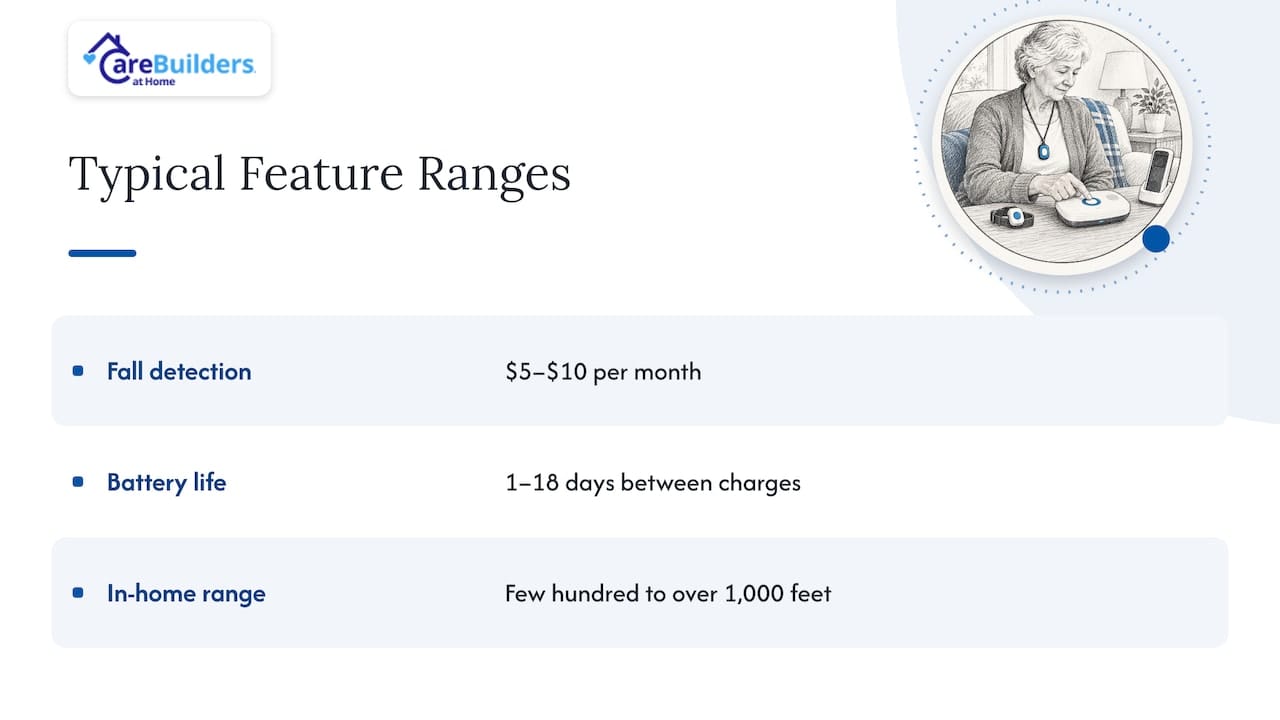
Industry-wide, fall-detection add-ons commonly run about $5 to $10 a month on top of base monitoring. Battery life and at-home range vary widely by device, from roughly one to eighteen days between charges and from a few hundred feet to over 1,000 feet of in-home range, according to Consumer Reports testing. Contract terms also vary: some vendors offer month-to-month billing, while others, including Life Alert, have historically required longer commitments. Insurance and discount programs differ by provider, so confirming current terms directly with each vendor before signing is worth the extra call.
Profiles of the Leading Alert Systems and Services
CareBuilders at Home: integrated monitoring with caregiver follow-through
Our 24/7 Medical Alert Monitoring service connects emergency response to a care team that already understands the client’s history, not a call center meeting them for the first time. We specialize in dementia care, which means monitoring works alongside caregivers trained to recognize confusion, wandering risk, or medication timing issues before they become emergencies. We help veteran families explore benefits that can offset care costs. Our virtual caregiver platform adds another layer of check-ins between visits, which suits families managing care from a distance.
Buying tip: ask whether monitoring includes any caregiver follow-up, since a call center alone cannot assess whether a fall points to a bigger health change.
Medical Guardian
Medical Guardian offers one of the broadest device catalogs in the category, spanning in-home base stations, mobile GPS units, and wearable options. Fall detection is typically offered as an add-on rather than bundled by default, so confirm pricing at checkout. Families who expect needs to change over time, from in-home only to mobile coverage, tend to appreciate having several device tiers under one account.
Buying tip: ask about upgrade paths between device tiers before committing to a plan, since switching later can involve new equipment fees.
MobileHelp
MobileHelp frequently posts lower starting monthly prices than many competitors, with both in-home and mobile device options. Fall detection is an added monthly cost, consistent with most vendors in this category. Budget-conscious buyers who want solid core coverage without premium add-ons often start here.
Buying tip: confirm whether the advertised starting price reflects monthly or quarterly billing, since some lower headline prices assume longer payment terms.
Bay Alarm Medical
Bay Alarm Medical stands out for customer service reach, with support available across phone, chat, and email most days of the week. Device options include both in-home and mobile units, with fall detection available as an add-on. Caregivers who expect to have setup questions or need help troubleshooting from afar may value the extra support channels.
Buying tip: test the support line before an emergency occurs, calling with a simple account question to gauge wait times and clarity.
LifeFone
LifeFone’s devices are frequently cited for long battery life, a practical advantage for seniors who forget to charge wearables regularly. Pendant designs are simple and lightweight, which can help with consistent daily wear. Fall detection and GPS mobile options are available as upgrades to the base plan.
Buying tip: ask for the specific battery-life rating of the exact device model under consideration, since battery performance varies across a vendor’s own product line.
LifeStation
LifeStation is often noted for GPS location accuracy, which matters for mobile units used outside the home. The company also runs insurance discount programs in some cases, worth asking about directly. Device options cover both in-home and mobile monitoring.
Buying tip: request documentation of any insurance discount before enrolling, since eligibility rules can vary by plan and region.
Medical Alert
Medical Alert tends to score well on ease of setup in independent testing, with clear instructions that suit households without a tech-savvy family member close by. Device types include in-home systems and smartwatch options. Fall detection is available as an add-on in most plans.
Buying tip: unbox the device with the person who will wear it and complete setup together, since early comfort with the process often predicts consistent daily use.
GreatCall Lively Mobile (Lively)
Lively has a long history serving older adults with mobile devices built around simplicity rather than a long feature list. This makes it a familiar choice for seniors who want a device that does one job clearly: call for help. Coverage is primarily mobile-focused.
Buying tip: confirm current plan names and features directly with the vendor, since product lines in this space are periodically renamed or restructured.
Philips Lifeline (Lifeline)
Lifeline carries decades of brand history and a broad monitoring network, with both at-home and mobile options. Its longevity in the market appeals to families who prioritize an established name over newer entrants. Fall detection is available as an add-on feature.
Buying tip: ask how long the monitoring center has operated under current ownership, since legacy brands sometimes change hands and monitoring quality can shift with them.
Life Alert
Life Alert is one of the most recognized names in the category, largely due to extensive marketing over several decades. The brand has historically been associated with longer contract terms than some newer competitors, so reviewing cancellation terms closely before signing is a reasonable step for any buyer. Device options include in-home and mobile units.
Buying tip: request the full contract length and early termination terms in writing before paying any deposit.
How to Choose the Right Medical Alert System
The simplest rule of thumb cuts through most of the noise: pick the device the person will actually wear every day, not the one with the longest feature list. A system with automatic fall detection sitting in a drawer protects no one.
Work through this checklist with the device in hand or on a call with the vendor:
- Wearability: is it a pendant, wristband, or smartwatch, and does the wearer find it comfortable for all-day use?
- Device type fit: does the household need in-home coverage only, or mobile GPS for someone who still drives or walks outside?
- Monitoring center hours and response: is the center staffed 24/7, and does the vendor publish average response times?
- False alarm policy: how does the monitoring center verify a real emergency versus an accidental trigger?
- Trial and return policy: is there a trial period, and what are the conditions for returning equipment?
- Contract terms: is billing month-to-month, and what does cancellation require?
- Caregiver app features: can family members receive notifications, location updates, or activity summaries remotely?
Independent experts emphasize wearability over advanced specs precisely because comfort and simplicity predict whether a device gets worn consistently, which matters more than any single feature on a spec sheet.
Pro Tip: During the trial period, test the full chain: press the button from the farthest room in the house, confirm the speaker is clear enough to hear and be heard, and check that a family member actually receives the notification on their phone.
What Medical Alert Systems Actually Cost
Most monitoring plans land in a $25 to $50 monthly range, with automatic fall detection typically adding another $5 to $10 a month on top of the base fee. Beyond the monthly charge, several other costs commonly show up:
- Equipment or activation fees: some vendors charge a one-time setup fee, while others waive it with annual billing.
- Protection plans: optional coverage against device damage or loss, billed separately from monitoring.
- Battery replacement or charging accessories: usually included, but worth confirming for older device models.
One in-market figure to know: Original Medicare generally does not cover medical alert systems, though some Medicare Advantage plans offer partial coverage. Checking current benefits directly with a plan or a licensed Medicare resource, such as Medicare coverage guidance from Mountaintop Insurance, can clarify whether a specific plan helps offset the cost.
To lower overall spending, ask vendors about annual billing discounts, confirm veteran benefit eligibility if applicable, and always get fall-detection add-on pricing in writing before enrolling.
How Reviewers Test These Systems and What to Verify
Reputable reviewers do not take vendor marketing at face value. Independent lab testing commonly uses twelve simulated falls, treating nine or more correct detections as a passing score for automatic fall-detection claims. Technical research on fall-detection algorithms shows that detection accuracy depends heavily on fall type: a sudden standing fall is far easier for a device to register than a slow slide to the floor or a fall from a seated position, which means a single pass rate does not capture how a device performs across every real-world scenario.
GPS accuracy checks typically involve carrying mobile units to multiple outdoor locations and comparing reported location against actual position. Response-time testing measures how quickly a monitoring center answers a triggered alert, an important signal since speed often matters as much as detection accuracy during a real fall.
Watch for these trust signals when comparing vendor claims:
- Published testing methodology: a vendor or reviewer who explains exactly how they tested fall detection and response times.
- Third-party lab involvement: testing conducted outside the vendor’s own marketing department.
- Older-adult tester panels: feedback from people in the actual target age group, not just engineers or reviewers.
When Integrated In-Home Monitoring Makes the Most Sense
Standalone monitoring devices work well for seniors who are largely independent and simply want a safety net. But some situations call for more than a button and a call center. When a loved one is living with dementia, managing complex medications, or needs overnight support several nights a week, pairing monitoring with an in-home caregiver closes a gap that a pendant alone cannot.
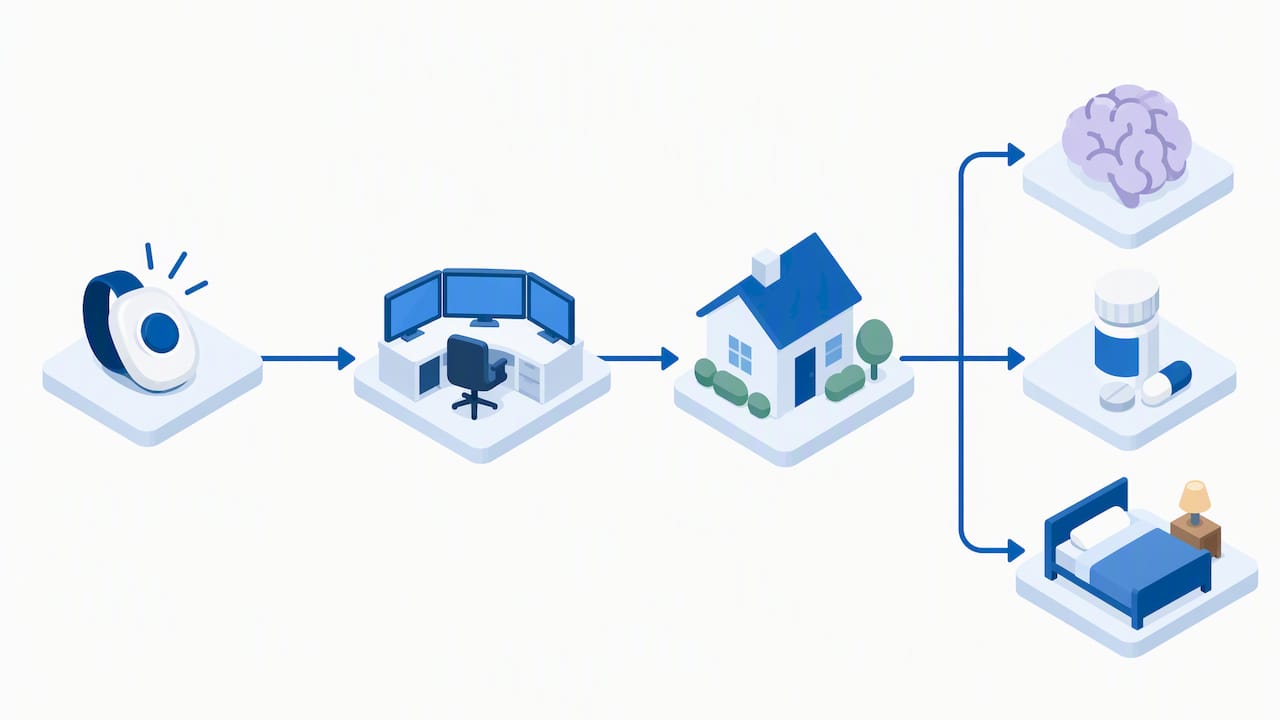
Our 24/7 monitoring service works this way by design: the same team familiar with a client’s routine also receives and responds to alerts, which shortens the distance between detection and help on the ground. For veteran families, our VA-approved status means benefit navigation happens alongside care planning rather than as a separate process. We built our virtual caregiver platform for exactly this gap, giving families remote visibility between in-person visits.
We recommend this integrated approach specifically for households managing cognitive decline, frequent falls, or caregiving loads that have outgrown a single device.
— cbahplano
Get Monitored Support That Grows With Your Family’s Needs
Choosing a medical alert system often starts as a search for a device, but for many families the real need is a team that understands the person behind the alert. Our 24/7 Medical Alert Monitoring service pairs emergency response with caregivers who already know a client’s history, and our mobile medical alert smartwatch option extends that same coordinated support outside the home. We also help veteran families explore benefits that can reduce out-of-pocket costs for care and monitoring together.
If your family is weighing a standalone device against a more connected approach, reach out for a consultation. We can walk through your loved one’s routine, mobility, and medical needs, and explain how monitoring fits into a broader in-home care plan built around them.
FAQ
What does AARP recommend for medical alert systems?
AARP’s testing emphasizes buying and trying a system before an emergency occurs, so the user gets comfortable with the device and caregivers can verify real response times under normal conditions. Their reviewers also use simulated fall tests, with a 9-of-12 detection rate serving as a common passing benchmark for automatic fall-detection claims.
Is there anything better than Life Alert?
Several providers, including Medical Guardian, MobileHelp, LifeFone, and LifeStation, offer comparable or broader device lineups, often with more flexible contract terms than Life Alert has historically required. For families who want monitoring paired with hands-on, in-home caregiver support, an integrated service like CareBuilders at Home’s 24/7 Medical Alert Monitoring addresses needs a standalone device cannot.
Which is better, Lifeline or Life Alert?
Both are long-established brands with in-home and mobile monitoring options, and the better fit depends on contract flexibility and specific device needs rather than brand name alone. Readers should compare current contract terms, fall-detection add-on costs, and device options directly with each vendor before deciding.
Which is better, Medical Guardian or Life Alert?
Medical Guardian generally offers a wider device selection, including GPS-enabled mobile units, while Life Alert is most known for its long-standing brand recognition. Families should weigh device variety and contract terms against brand familiarity based on their own priorities and budget.
How much does fall detection typically add to the monthly cost?
Fall detection usually adds about $5 to $10 a month on top of base monitoring fees, which commonly range from $25 to $50 depending on the provider and plan.
Sources
- 6 Best Medical Alert Systems in 2026: Tested and Approved (AARP)
- The Best Medical Alert Systems with Fall Detection (NCOA)
- Best Medical Alert Systems (Consumer Reports)
- PMC article on fall detection